Windows Beta v1.3.1 · Linux Beta v1.2.9
XMR.gives Miner
See your PEPE balance, choose or instantly switch raffle routes, invite friends, and run one controlled RandomX engine while keeping 20% of system capacity in reserve.
Windows Beta v1.3.1 is required for GPU mining and includes Wembley RandomX, GhostRider, and the repaired PearlPoW path. It requests Administrator mode when opened.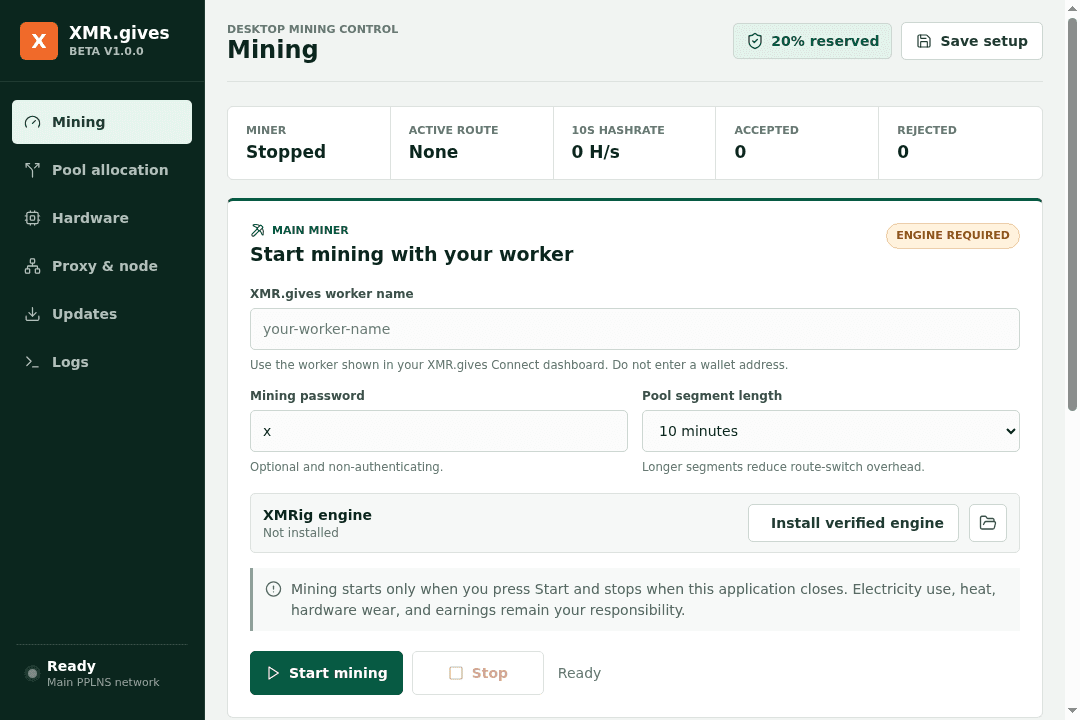
Unsigned recovery release · v1.3.1 remains mandatory
Fix the automatic update signature error
The original release used an Azure Private Trust certificate that ordinary Windows PCs do not trust. This recovery installer is unsigned and configures the app to accept unsigned updates. HTTPS and SHA-512 download checks remain enabled, but these do not provide independent publisher authentication.
One-time repair for an existing installation: stop mining, completely close XMR.gives Miner, run Update Repair below, and select the installed app folder. Reopen the miner. Version 1.3.0 will automatically download v1.3.1; select Install and restart to finish. The repair backs up the old app update configuration and changes no account data or Windows security settings.
Download Update RepairAlternatively, install the v1.3.1 recovery installer directly over your existing installation. No uninstall is needed. Both paths request Administrator approval. Windows may still show Unknown publisher or SmartScreen warnings; organizational restrictions remain in force.
Mining behavior may also be reviewed by Defender or another security product. Download only from https://xmr.gives, verify the exact SHA-256 digest, review any detection, and do not disable antivirus or organizational security policy.
Windows installer SHA-256 · v1.3.1
99ef04713152498d7e4dd8b7779c55c5b1bca5a07ada69a8507969465cc19f57Update Repair SHA-256 · v1.0.0
75047708992de64972e5d3780888ee7d2ad83a13655bb0967fb98fdc93d7a44aInstallation
Start on Windows or Linux
Windows x64
- Download the v1.3.1 recovery installer above, or use the manual link in the required-update dialog.
- Run
Get-FileHash .\XMR.gives-Miner-Beta-1.3.1-recovery-win-x64.exe -Algorithm SHA256in PowerShell and compare it with the published digest. - Review the Administrator approval and any Defender or SmartScreen notice; continue only when the source and digest match.
- Install, connect your XMR.gives account, choose a raffle and select Start. Wembley CPU engines are included; the pinned PearlPoW engine downloads only when a supported NVIDIA GPU is selected.
Linux x86-64
- Download the AppImage.
- Verify
sha256sum XMR.gives-Miner-Beta-1.2.9-linux-x86_64.AppImagereturns2044bcd13476ec6c7088f4b46315bcf80cb654239651db240d1f3f20602b735e. - Make it executable with
chmod +x XMR.gives-Miner-Beta-1.2.9-linux-x86_64.AppImage. - Open it, connect your account, and install the verified XMRig engine.
The Windows installer includes Wembley RandomX, Wembley GhostRider SSE2/AVX2, matching source and licenses, the built-in Wembley Gateway, and the optional Monero node. It contains no XMRig, XMRig Proxy, or PearlPoW executable. The pinned PearlPoW engine is a first-use publisher download. Compatible NVIDIA drivers are required. Nothing mines during installation, and managed processes stop when the app closes.
Changelog
Active channel: Windows Beta v1.3.1 · 24 September 2026
Beta v1.3.1 is required for GPU mining and replaces the obsolete lpminer with checksum-pinned PeakMiner 2.16.5. The separately named unsigned recovery installer repairs future automatic downloads. Existing publisher-pinned installations need the one-time Update Repair or a direct recovery installation first.